Here at TympaHealth we are always striving to develop our service and provide the best possible information for our valued customers.
As part of our service, we have created ‘Tips & Tricks’ to help you get the best out of your Tympa.
Tips & Tricks
1. Remain connected to a strong and stable internet connection for uploads – To ensure you get the best user experience and benefit from the latest features and updates, please ensure you are connected to Wifi. If you are doing a home visit and do not have access to Wifi, ensure you upload as soon as you get back to your base location.
- Connect to ‘Secure Wifi’ networks and avoid ‘Guest Wifi’ networks..Ensure the Tympa App is open and connected to Wifi when you are not using the Tympa system and press ‘the recycle button’ under Sync Manager tab for uploads
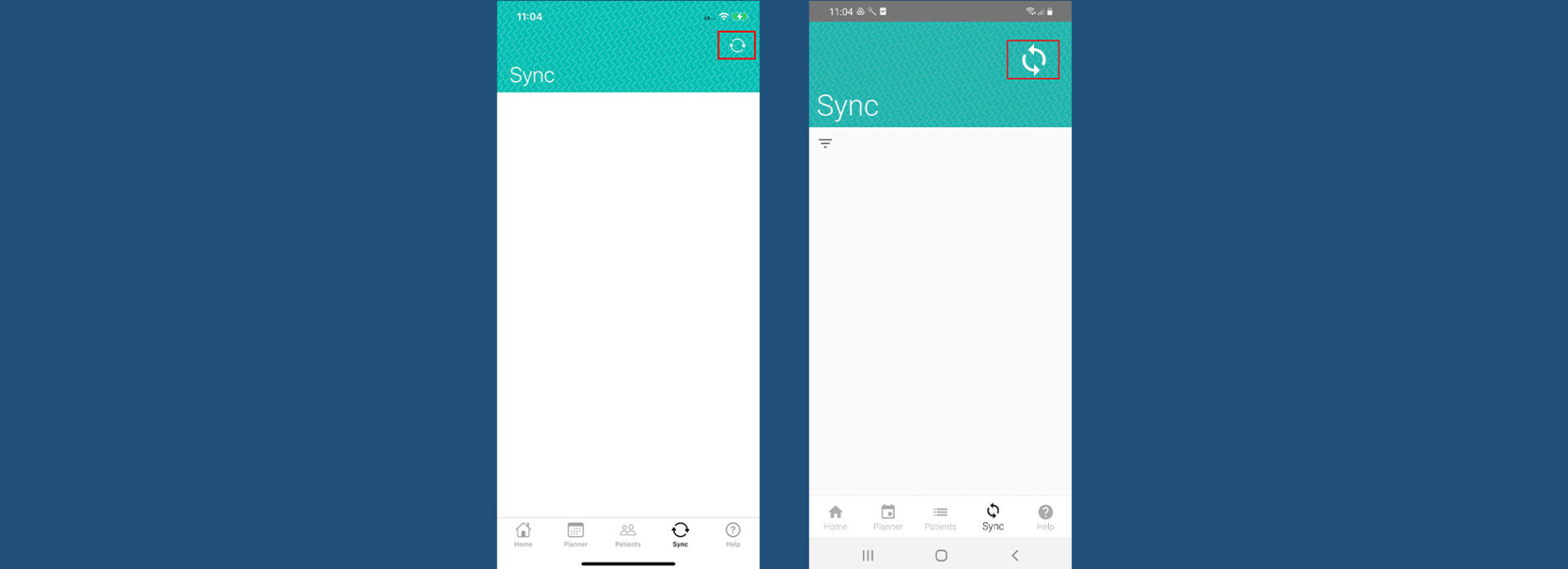
2. Connection Issue Notification – The Sync Manager has been improved to include a notification when your device has no connection. This applies to both Android and iOS.
- When the connection issues appears, exit the app.
- Connect to Wifi
- Open the Tympa App and press Sync
3. The Tympa Panel is supported by modern web browsers such as Chrome, Firefox and Safari. If you see a blank screen when accessing the panel, this is quite likely to be because you are using a non-supported browser. Please use the latest version of Chrome for the best experience.
4. Your Tympa device loves to be;
- Charged
- Continuously connected to Wifi- with a good upload speed.
- Kept up to date with the latest (Android/iOS) phone software
- Updated with the latest Tympa App software installed
Support services – FAQ and resource hub
We hope you find our ‘tips & tricks’ useful. They have been designed with our valued customers in mind. Please also make use of our handy FAQ and resource hub where you can get immediate access to support materials outside of working hours.
If you require any further help with your Tympa device, please don’t hesitate to contact our support team on [email protected] or 0808 304 8800.